Visualization
csdl_dafoam.viz reads flow solutions from an OpenFOAM/DAFoam case and plots them, without ParaView and without any OpenFOAM
tool. It reads serial cases and MPI-decomposed ones (processor*/<time>, reassembled on the global mesh through the
cellProcAddressing/pointProcAddressing files decomposePar wrote), and it uses the deformed mesh DAFoam saved with each
solution, so each plot shows the design that was solved.
Which solution is plotted
DAFoam writes the converged primal solution of the current design at an integer time (the number of SIMPLE iterations), and renames
it to counter x 1e-4 when an adjoint is computed for it. read_solution(case) therefore takes the largest integer-named time
directory that has a pressure field, which is the most recent flow solve. The examples read it twice, after the analysis (the
initial design) and after the optimization (the final one). Pass time="0.0003" to look at an earlier renamed solution.
Command line
python -m csdl_dafoam.viz CASE [--field Cp|Mach|p|T|U] [--time T] -o out.png      # one design: field contours
python -m csdl_dafoam.viz CASE_A CASE_B --labels initial,optimized -o compare.png    # two designs side by side
python -m csdl_dafoam.viz CASE --vtk-patch wing -o flow.png                          # also write the wing as VTK
Python
from csdl_dafoam import viz

sol = viz.read_solution("run/case")                    # fields p, U, T on the global, deformed mesh
viz.mach_number(sol)                                   # cell-centred Mach
ax = viz.plot_field_2d(sol, "Cp", vmin=-1.5, vmax=1.0)  # contours; also "Mach", "p", "T", "U"
dist = viz.surface_distribution(sol)                   # dict of x, z, cp, upper around the airfoil, LE -> upper -> TE -> lower
fig = viz.plot_airfoil_comparison([sol_a, sol_b], labels=("initial", "optimized"))   # Cp contours (field="Mach" for Mach), surface Cp, shapes
viz.write_patch_vtk(sol, "wing", "wing.vtk")           # boundary patch with cell values, for ParaView / PyVista
Freestream values for Cp default to those of the bundled cases (101325 Pa, 300 K, 238 m/s); pass p_inf, T_inf, speed_inf for
others. Wall values are those of the wall-adjacent cells, which is exact here because the wall pressure condition is zeroGradient.
2D and 3D are different problems
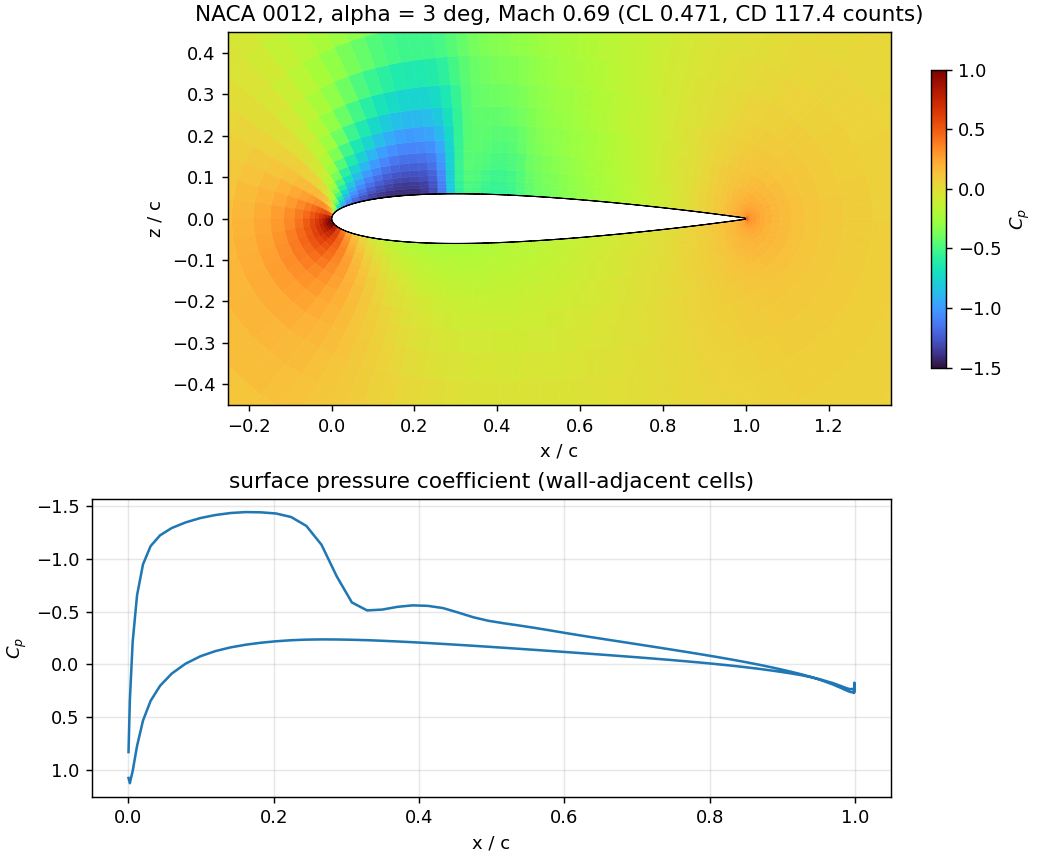
2D (airfoil) cases are one cell thick with symmetry patches on the two span ends. The faces of one of those patches are exactly the
cells, projected on the x-z plane, so plot_field_2d draws one polygon per cell coloured by its value: no interpolation, no
triangulation, and it works for any cell shape. The airfoil outline is drawn from the wall patch.
3D (wing) cases have no such reduction: the interesting quantities are on the wing surface and on slices through the volume.
write_patch_vtk(sol, "wing", path)writes the wing surface (any boundary patch of any case) withp,Mach,Tas legacy-VTK PolyData, which ParaView and PyVista open directly;plot_surface_3d(sol, "wing", field="Mach", path="wing.png")renders it off-screen with PyVista (a dependency oflsdo_geo, so usually already installed);volume slices and iso-surfaces: use ParaView on the case itself, or read the mesh and fields with
read_solutionand slice with NumPy.
Note
The 3D functions are covered by unit tests only on the bundled 2D mesh (which is a 3D mesh one cell thick). They have not been run on a real 3D wing case, because none is bundled; expect to adjust them there (for example the patch names and the orientation conventions of your mesh).
A movie of an optimization
During an optimization DAFoam keeps the converged flow solution of every gradient evaluation on disk (time directories 0.0002, 0.0004, …).
AirfoilModel.optimize records which directory belongs to which design, together with CD, CL and the design variables
(model.history), and viz.make_movie turns them into a dashboard, one frame per optimizer iteration, with no cost to the
optimization (about 0.2 s per frame afterwards):
table = viz.read_optimization_history("ASO_2DAF_rank0_outputs")      # modOpt's iteration table: optimality, feasibility, ...
viz.make_movie("run/case", ["movie.gif", "movie.mp4"], model.history, table=table, cl_target=0.5)
Each frame shows the pressure-coefficient contours, surface C_p and airfoil shape of that iteration (the initial ones in grey) and the drag, lift,
optimality and feasibility histories with a marker at the current iteration. A .gif always works; .mp4 needs ffmpeg on the PATH.
airfoil_optimization.py does this for you (--no-movie skips it), and viz.plot_optimization_history(table, iterations=model.history, cl_target=0.5)
draws the static convergence figure.
Output of the examples
airfoil_analysis.py saves analysis.png; airfoil_optimization.py saves optimization.png (initial and optimized pressure-coefficient contours,
surface C_p of both, and the two shapes), history.png, and the movie. Both skip the plots with --no-plot, and skip them with a message if no
flow solution is found.